If you love realistic family saves, these free Kemzima Sims 4 mods add useful routines that fit naturally into everyday gameplay. This roundup includes school transportation, functional nursery technology, better object assignments for young children, and a detailed dietary system. Each mod has a different purpose, so you can install the features that suit your household instead of changing everything at once. All five downloads were listed as publicly available on Kemzima’s official website when checked on September 25, 2026. Be sure to read the requirements under each section, remove older versions, and download the latest Lot51 Core Library before loading your save.
Free Kemzima Sims 4 Family Gameplay Mods
1. School Bus Service
2. Functional Baby Monitor
3. Functional Baby Sound Machine
4. Claim My Objects Collection
5. My Dietary Life
1. School Bus Service
The School Bus Service brings back a beloved family-gameplay detail by letting children and teens travel to school by bus. Households can apply for service through the phone, choose from five bus styles, and send students aboard during the morning pickup. Caregivers can see children off, while late students may miss the bus and receive a moodlet. Version 1.6 supports game version 1.128.90.1030 and requires the Lot51 Core Library.
View and Download from Kemzima
2. Functional Baby Monitor Mod & CC Pack
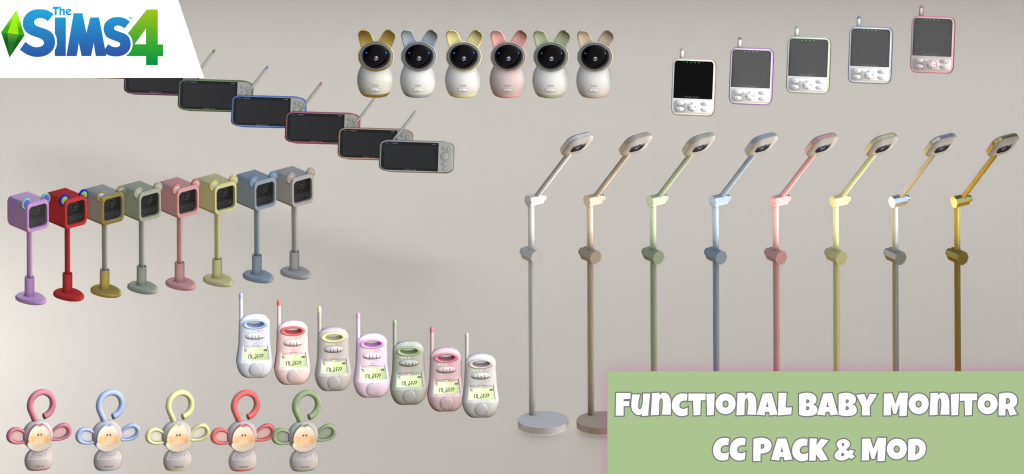
This mod adds three ranges of functional baby monitors with audio or simulated video features. Caregivers can pair nursery units with parent receivers, receive crying alerts and quiet needs indicators, play lullabies, talk or soothe through supported monitors, and view simulated health readings on premium models. Version 6.0 supports game version 1.128.90.1030 and requires Lot51 Core. Download either the fully functional version or the decorative CC-only version—never install both together.
View and Download from Kemzima
3. Functional Baby Sound Machine
The NooBoo CozyGlow Sound Machine is a functional nursery object with 15 custom sounds and a separate night-light. Adult Sims can choose ambient noise, nature sounds, womb rhythms, or lullabies, while babies, infants, and toddlers react in different ways. It is a sweet addition for bedtime routines and nursery storytelling. The official page lists version 4.0 for game version 1.126.58, and the Lot51 Core Library is mandatory.
View and Download from Kemzima
4. Claim My Objects Collection
Claim My Objects helps busy family households stay organized by assigning specific cribs, toddler beds, playmats, highchairs, and potties to individual Sims. Infants and toddlers can claim supported objects themselves, or an adult caregiver can assign them. The ownership affects supported caregiving and autonomy, including nanny and butler behavior. Version 2 requires the Lot51 Core Library plus both mandatory Claim My Objects core framework files; optional object modules can be removed individually.
View and Download from Kemzima
5. My Dietary Life
My Dietary Life makes meals more meaningful through three optional modules: dietary preferences, lifestyles, and restrictions. Sims can develop food likes and dislikes, favorite foods and drinks, lifestyle commitments, allergies, and other restrictions. Installing all modules unlocks a helpful dietary panel. Version 2.8 supports game version 1.128.90.1030. Lot51 Core and Lumpinou’s Mood Pack are required, while Zerbu’s Custom Preferences is needed for preferences; the restrictions module requires Get to Work.
View and Download from Kemzima
How to Install Kemzima’s Mods
Download each mod from its official page and unzip the folder. Delete every older version before adding the new files to Documents > Electronic Arts > The Sims 4 > Mods. Keep script files no more than one folder deep, install the required Lot51 Core Library, and enable both Custom Content and Script Mods in Game Options. Restart the game after making changes.
You May Also Like
27 Sims 4 Gameplay Mods You Need for Better Gameplay
Sims 4 CC Finds: Hair, Clothes & Family Gameplay
How to Install Sims 4 CC and Mods in 2026
All mods and preview imagery belong to Kemzima. Always use the creator’s official links, review current requirements, and check compatibility after each Sims 4 patch.