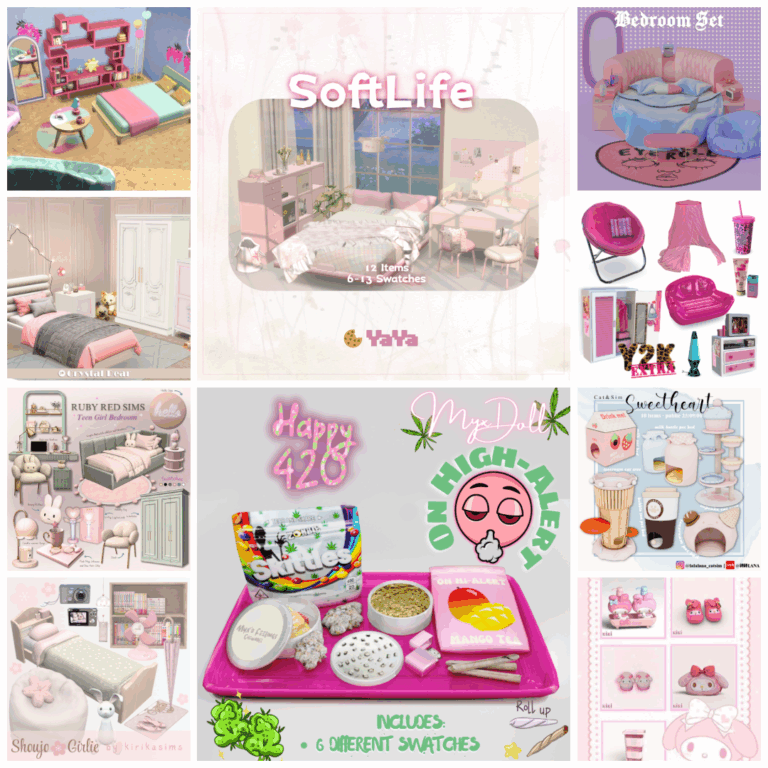
How to Find the Best Sims 4 CC on Pinterest

Tired of the same old furniture, outfits, and hairstyles
bogging down your Sims 4 game? Custom Content (CC) is the answer!
It allows you to personalize your Sims’ world with unique items that enhance the game’s aesthetic and playability.
And where better to find a treasure trove of curated, inspiring CC than Pinterest?
Pinterest is a visual goldmine for Sims 4 CC,
offering everything from hyper-realistic furniture sets to quirky,
off-beat fashion statements. However, navigating the vast landscape can be overwhelming.
This guide will help you navigate Pinterest like a pro and find the best CC to elevate your Sims 4 experience.
Sims 4 hair cc finds and clothing
Must-Have Custom Content Clothing Finds for The Sims 4
sims 4 cc finds download now
Why Pinterest is Perfect for Finding Sims 4 CC:
- Visual Inspiration: See the CC in action! Pinterest showcases CC in room builds, outfit showcases,
- and Sim makeovers, giving you a clear idea of how it will look in your game.
- Curated Collections: Users create boards dedicated to specific CC types (e.g., “Sims 4 Bedroom CC,” “Sims 4 Maxis Match Hair”).
- Direct Links: Most pins contain direct links to the creator’s website or download page, making it easy to obtain the CC you love.
- Discover New Creators: Explore different boards and pins to uncover hidden gems and talented CC creators you might not find elsewhere.
- Organization and Planning: Save pins to your own boards to organize your favorite finds and plan your next Sims 4 build or makeover.

Mastering Pinterest for Sims 4 CC Hunting:
Here’s how to maximize your Pinterest experience and find the best CC:
1. Start with Specific Keywords:
- Be precise: Generic terms like “Sims 4 CC” will yield overwhelming results.
- Hone in on what you’re looking for. Examples:
- “Sims 4 Kitchen CC Modern”
- “Sims 4 Male Hair Maxis Match”
- “Sims 4 Kids Room CC”
- “Sims 4 Cottagecore Clothes”
- Use modifiers: Add terms like “TS4,” “Download,” “
- Free,” “Tumblr,” or “Blog” to refine your search.
- Explore similar ideas: Pinterest will suggest related searches
- based on your initial query. Use these to discover new avenues.
2. Explore Existing Boards:
- Search for themed boards: Look for boards dedicated to specific aesthetics, styles, or creators. Examples:
- “Best Sims 4 Maxis Match CC”
- “Sims 4 Alpha CC Finds”
- “Sims 4 Modern Home Decor”
- Follow board creators: If you consistently like the content on a
- particular board, follow the creator to stay updated with their latest finds.
3. Analyze the Pin Details:
- Read the descriptions: The pin description often provides valuable information
- about the CC, including the creator’s name, style, and any specific requirements.
- Look for direct links: Ensure the pin links directly to the CC download page
- or the creator’s website. Beware of dead links or redirects to suspicious sites.
- Check the comments: Other users may have left comments
- about the CC, including potential issues or positive feedback.
4. Identify Your Preferred Style:
- Maxis Match vs. Alpha: Understand the difference and decide which style you prefer. Maxis
- Match CC seamlessly blends with the game’s original art style, while Alpha CC aims for a more realistic look.
- Develop a personal aesthetic: Are you drawn to modern minimalism, rustic
- farmhouse, or gothic glam? Identify the styles that resonate with you and focus your search accordingly.
5. Stay Organized:
- Create dedicated boards: Organize your findings by creating separate boards for
- different CC categories (e.g., “Sims 4 Clothing,” “Sims 4 Furniture,” “Sims 4 Hair”).
- Use sections within boards: Further categorize your
- boards by style or theme (e.g., “Bohemian Clothing,” “Modern Kitchens”).
Important Considerations & Safety Tips:
- Always download from reputable sources: Stick to the creator’s official website,
- Tumblr, or Patreon. Avoid downloading from third-party sites that may contain malware.
- Read the creator’s terms of use: Some creators have specific rules
- regarding the use and distribution of their CC. Respect their wishes.
- Test your CC: Download and install a small amount of CC at a
- time to ensure compatibility with your game and avoid potential conflicts.
- Back up your saves: Before installing any new CC,
- always back up your Sims 4 saved games in case something goes wrong.
Conclusion:
Pinterest is a powerful tool for finding amazing Sims 4 CC that can transform your game.
By using specific keywords, exploring themed boards, and staying organized, you can
unlock a world of creative possibilities and personalize your Sims’ lives like never before. Happy Simming!