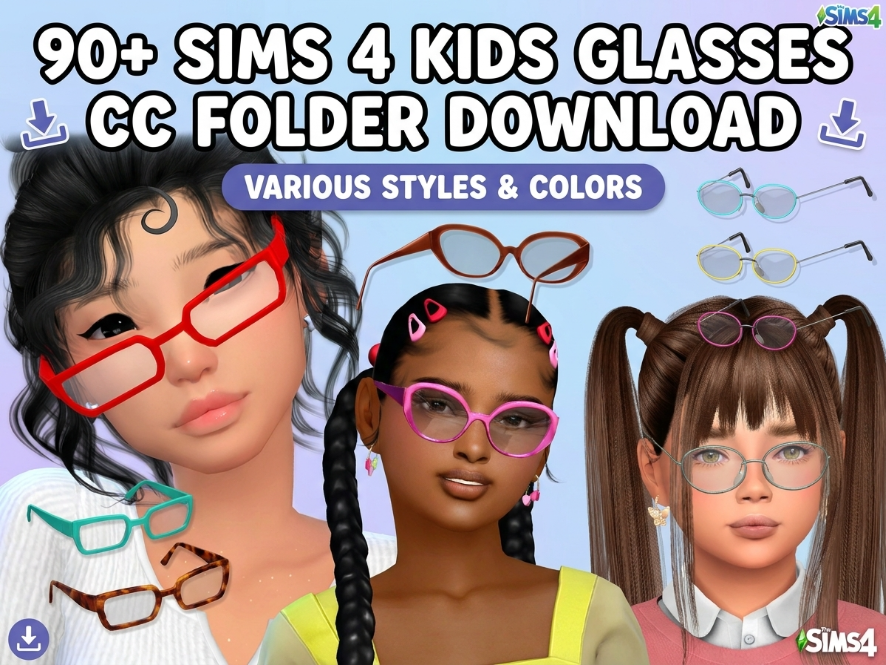
90+ Sims 4 Kids Glasses CC Folder Download
Meta Description: Download a Sims 4 kids glasses CC folder with 90+ child and toddler glasses, sunglasses, cute eyewear, butterfly glasses, heart glasses, and CAS accessories.
Looking for cute Sims 4 kids glasses CC? This folder is packed with over 90 glasses and eyewear custom content items for toddler and child Sims. If you love styling your younger Sims with cute accessories, this CC folder is perfect for your Mods folder.
This download includes a mix of kids glasses, toddler glasses, sunglasses, butterfly glasses, heart glasses, oval glasses, colorful eyewear, and fun CAS accessories. These are perfect for school outfits, family gameplay, toddler makeovers, child Sim lookbooks, screenshots, and everyday CAS styling.
Sims 4 Kids Glasses CC Folder Preview
The folder preview shows 94 items inside, including package files from creators like Suzu, GiuliettaSims, RetroReBOOT, Lily Butterfly Glasses, and more.
Download Sims 4 Kids Glasses CC Folder
💖 Download Kids Glasses CC Folder 💖
What’s Inside This Kids Glasses CC Folder?
This Sims 4 kids glasses CC folder includes a variety of eyewear options for toddler and child Sims. It is great for adding more personality and detail to your younger Sims in Create-A-Sim.
- Kids glasses CC
- Toddler glasses CC
- Child sunglasses
- Heart glasses
- Butterfly glasses
- Oval glasses
- Colorful eyewear
- Fun CAS accessories
- School outfit accessories
- Everyday kids eyewear
Why Download Kids Glasses CC?
Sims 4 kids glasses CC can make toddler and child Sims look more unique, cute, and realistic. Glasses are a small CAS detail, but they can completely change the look of a Sim.
This folder is perfect for players who love family gameplay, child Sims, toddler Sims, school outfits, lookbooks, family screenshots, Sim dumps, and cute CAS makeovers.
How To Install This Sims 4 CC Folder
After downloading the folder, extract the zip file first.
Then place the extracted .package files inside your Sims 4 Mods folder:
Documents → Electronic Arts → The Sims 4 → Mods
Open The Sims 4 and go to Game Options → Other. Make sure Custom Content and Mods are enabled. Restart your game, then check Create-A-Sim for your new kids glasses and accessories.
Important CC Folder Reminder
Since this folder has many items, always back up your Mods folder before adding everything. If something does not show up or looks broken, test the files in smaller batches.
Some glasses may appear under accessories, glasses, face accessories, or CAS categories depending on how the creator made them.
You May Also Like
More Sims 4 Kids CC
Sims 4 Toddler CC
Sims 4 Accessories CC
More Sims 4 CC Folders
More Kids Glasses on Sims4Kids